
Scripting with Windows and Git
Ever need to write a script to check out a git repo? Bypassing the credentials prompt? Securely? On Windows?
I did! And it was painful!
I started going down a deep dark rabbit hole of hacks that stored my credentials in plain text and did not properly work in Windows. Until I discovered a neat little tool called Git Credential Manager for Windows (GCM).
Git Credential Manager for Windows
The GCM is a credential helper for Git that securely stores our git credentials using the Windows Credential Manager.
When making an initial git request, the GCM will prompt us for our git credentials and save them. All further git requests will reuse these credentials. We won't need to re-enter them ever again.
To see if GCM is currently installed, simply run:
git credential-manager version
To setup GCM as our default credential helper, ensure our git configuration is using:
credential.helper=manager
To view our git configuration (project, global, and system) run:
git config -l
git config -l –global
git config -l –system
And set at least one with:
git config –global –unset credential.helper
git config –global –add credential.helper manager
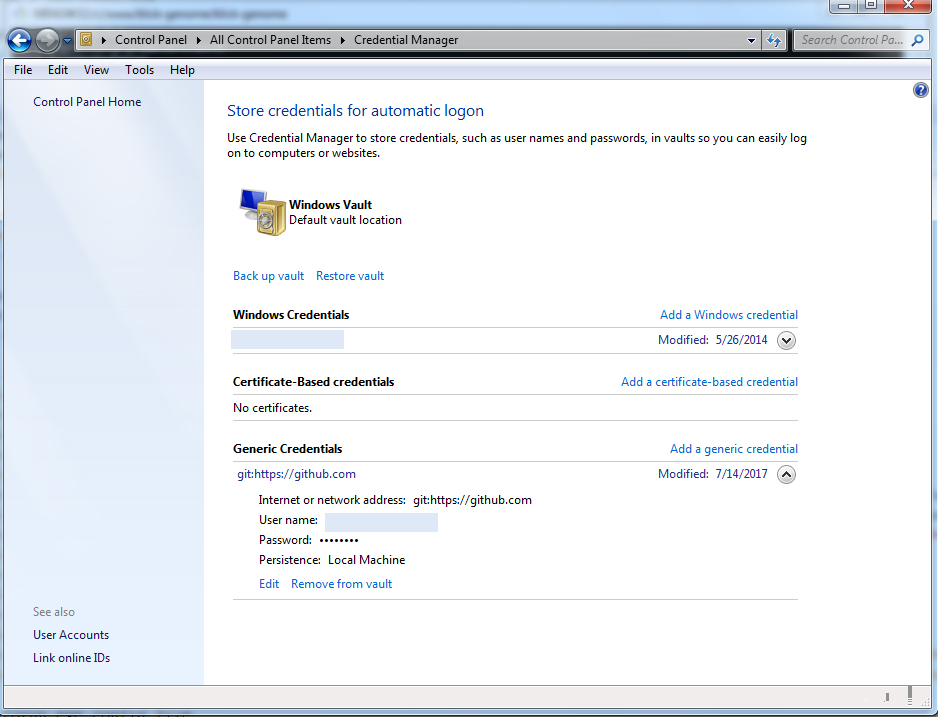
Finally, after making our first git request and entering our git credentials, we can verify our credentials are stored in the Windows Credential Manager by going to Control Panel > Credential Manager
Programmatically store Git Credentials
Now that GCM is properly configured, our scripts can make git requests, bypassing the credential prompts.
But what if we want to set those initial git credentials programmatically?
We can with:
cmdkey /generic:LegacyGeneric:target=git:https://github.com /user:$gitUsername /pass:"${gitToken}"Powershell Script
Tying everything together, here's our powershell script that will store our git credentials and run git fetch.
gitUsername="username"
gitToken="token"
cmdkey /generic:LegacyGeneric:target=git:https://github.com /user:$gitUsername /pass:"${gitToken}"
cd project_repo
git fetch
Success!
Almost? Remember to edit the first two lines to fetch those credentials securely. Don't leave them in plain text.
And if you are using github, setup a personal token instead of using your password.
I'll leave this up to you :)
Happy Coding!