
Amazon Alexa – An Introduction to Alexa Skills
“Alexa, turn on the lights”, “Alexa, what's the weather in Toronto?”, “Alexa, tell us a joke!”
You might be wondering what I'm doing until you see the magic the Amazon Echo can perform. You can ask this device anything, and it will try to fulfill all your wishes. At least any request that can be fulfilled via a web service call. And all of this magic is what Amazon calls Alexa Skills.
Alexa Skills
There are three main types of Alexa skills:
- Flash Briefing Skills. This skill is essentially an RSS feed aggregator. If you have an RSS feed, you can create your very first skill within a few clicks. Users can then ask “Alexa, what's my flash briefing?” and she will verbally read all these feeds.
- Smart Home Skills. Ever want to use your voice to control your smart home appliances? Well, you can very easily with this skills.
- Custom Skills. And lastly, the most common and most generic skill, that can handle almost any type of request.
Let's take a deeper dive into Custom Skills.
Custom Skills
Custom skills comprise of two main components:
- Skill Interface: This allows us to map voice commands to actions, or what amazon calls, utterances into intents.
- Skill Service: A publicly accessible web service that is going to execute those intents.
Alexa Skill Architecture
The Alexa Skill architecture is quite powerful in it's simple elegant design. The whole architecture lives within the cloud. There is actually no skills physically installed on any Alexa enabled device. As soon as I say “Alexa” followed by a voice command:
- The Echo will wake up on the keyword Alexa, and send my voice as an audio stream to the Alexa Web Service.
- The Alexa Web Service will process the audio stream and determine which skill and intent is being requested, and then call the corresponding Skill Service.
- The Skill Service will execute the intent and return a response back to Alexa Web Service.
- Alexa Web Service will convert that response back to an audio stream and send it to the Echo.
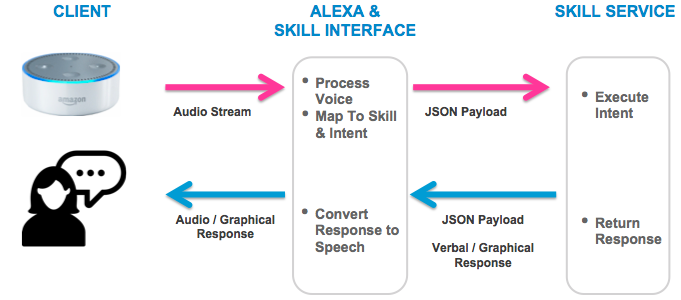
As you can see from above, my voice is only sent to the Alexa Web Service. It will never be sent to the Skill Service. So as the skill developer, you will never have to worry about how to process natural language. Alexa will manage all voice processing for us, and she does an excellent job.
There are numerous types of devices that can interact with Alexa, including graphical devices. This allows us to build some really interesting verbal and graphical interactive experiences. In addition, Alexa Skill Service can be used by 3rd party developers. If you were building your own application with your own hardware, it is very easy to hook into Alexa for your voice user interface.
An Example Alexa Skill
Let's create our first skill!
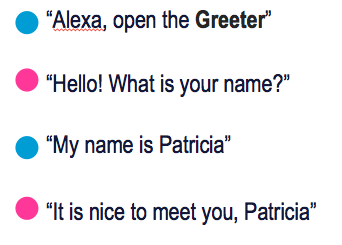
Configure Skill Interface
In order to configure the skill interface, we need to define three pieces of information:
Define an Invocation Name.
An invocation name is simply the verbal name of our skill and it enables Alexa to distinguish our skill from all other skills. In our case, we gave our skill the very unique name called “The Greeter”
Define Intents.
An intent is an action based on a user's request. So in our example, since we have two user requests, we will need two intents.
The first user request “Alexa, open the Greeter” launches the first intent called “LaunchRequest” intent. This is a default intent that comes with all skills and it essentially launches our skill.
The second user request “My name is Patricia” triggers our second intent which is a custom intent we called “NiceReply”.
Define Utterances.
For each of our intents, we will need to define a list of utterances. Utterances are a sample list of phrases that will trigger our intents. In our example, the utterances “Alexa, open the Greeter” and “My name is Patricia” triggered both of our intents.
So now that we know what we need to define, let's see the actual code.
| INVOCATION NAME: | GREETER |
| UTTERANCES: |
|
| INTENT SCHEMA: | {"intents": [{
"intent": "NiceReplyIntent",
"slots": [{
"name": "FIRSTNAME",
"type": "AMAZON.US_FIRST_NAME"
}]
}]} |
As you can can see here, we've mapped some utterances to the NiceReply intent. We've also substituted my name with what is called a slot. Since we want our skill service to receive the user's first name, a slot allows us to pass this additional information. Furthermore, the intent schema defines the data type for that slot as AMAZON.US_FIRST_NAME. There are various data types, such as date, time and numeric, that we can use within our utterances to pass information to our skill service.
Configure Skill Service
Now that we have the skill interface defined, we move onto the skill service. The skill service needs to be a publicly accessible web service. The easiest way to make web service in the amazon world is to use Amazon Lambda. And conveniently, Alexa skills can integrate quite easily to Lambda.
var Alexa = require('alexa-sdk');
exports.handler = function(event, context, callback) {
	var alexa = Alexa.handler(event, context);
	alexa.registerHandlers(handlers);
	alexa.execute();
};
var handlers = {
	'LaunchRequest': function () {
	this.emit(':ask', "Hello!  What is your name?");
	},
	'NiceReplyIntent': function () {
	var currentName = this.event.request.intent.slots.FIRSTNAME.value;
	this.emit(':tell', "It is nice to meet you, " + currentName);
	}
};
The Lambda above is written in node and the first line imports the alexa-sdk. The Alexa SDK is a library that we can use to help process the payload back and forth between Alexa Web Service and our Skill Service. The payload is quite simple, just a json or xml payload, so we don't necessarily need it. However, the SDK does make code a little easier to read.
Next, we define the main lambda handler followed by two handlers for each of our intents. The LaunchRequest handler simply asks the user “Hello! What is your name?”. The NiceReplyIntent handler will fetch the FIRSTNAME slot value from the utterance and tell the user “It's nice to meet you”. There are various other types of responses an Alexa skill can return, including content marked as a graphical card of information and the ability to change the pitch or speed of verbal content.
Conclusion
So as you can see, Alexa skills are extremely easy to setup and configure. And most importantly, they are really fun to play with! I spent a few hours learning all the various components that were required to setup and configure my echo dot, and within an evening I had my very first (private) alexa skill that did all my bidding to take over the world. Or at the very least, she told me she loved me. 
If you want to learn more, there are numerous online tutorials and resources available, including Alexa Skills Kit Voice Design Best Practices and Alexa Voice Design Guide
Happy Coding!